
Hello Everyone,
As part of our ongoing efforts to enhance the security of university accounts and protect our community from phishing attacks, account compromise, and identity theft, we will be retiring SMS (text message) and Voice Call authentication for Multi-Factor Authentication (MFA).
While text messages and phone calls have helped improve account security over the years, newer authentication methods provide significantly stronger protection and a more reliable user experience. For this reason, all members of the university community will be asked to transition to a supported MFA method before SMS and Voice authentication are retired.
The university strongly recommends using the Microsoft Authenticator app, which offers a secure, simple, and convenient sign-in experience.
When Is This Happening
Phase one: Awareness and Registration Period
Start Date: 11/11/2026
End Date: 01/08/2027
During this period, Harrisburg University recommends that you review your current MFA settings. You can achieve this by clicking My Sign-Ins and then navigating to where you can see your registered MFA methods. If you find that you're currently relying on SMS or Voice authentication, we strongly recommend you register a new authentication method at this time. If you need assistance regarding this matter, please consult the instructions included in this email, or reach out to ithelp.harrisburgu.edu and submit to a ticket to receive further guidance.
Phase two: SMS and Voice Enrollment Ending
Start Date: 11/11/2026
End Date: 01/07/2027
Happening at the same time, users that are currently using SMS and Voice as their MFA method will begin to be pushed away from that method. You may already be seeing notifications when you sign-in to register with Microsoft Authenticator. Currently, users can snooze this alert for 48 hours, however in the near future this will not be supported, and users will have to register a valid MFA method.
Phase three: SMS and Voice Retirement
Start Date: 01/08/2027
End Date: Indefinite
Starting January 8th of 2027, Harrisburg University will permanently disable SMS and Voice authentication for all university accounts. Users who have not registered a supported MFA method will not be able to access HU resources until they complete MFA registration.
What Should I Do?
Register with the Microsoft Authenticator app. The Microsoft Authenticator app is the university's preferred MFA solution. It provides stronger protection against phishing and account compromise than SMS and voice, while simultaneously allowing for quick sign-in approvals through push notifications. Microsoft Authenticator will support self-service password resets (SSPR) and other account recovery processes. It is free to download and use on most mobile devices.
How Do I Register Microsoft Authenticator?
To register your Harrisburg University account with Microsoft Authenticator, do the following.
Step 1. Install Microsoft Authenticator
On iPhone (iOS)
Open the App store, search for Microsoft Authenticator and make sure to download the app published by Microsoft Corporation
On Android:
Open the Google Play Store. Search for Microsoft Authenticator, and install the app published by Microsoft Corporation
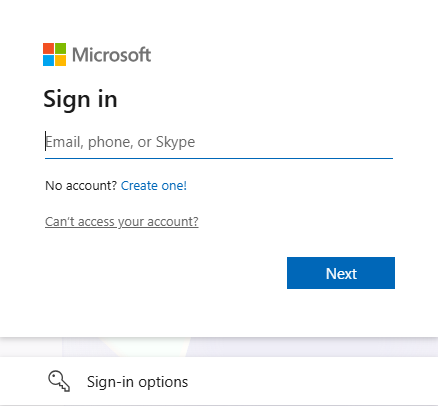
Step 2. Sign in to the Security info page of your work or school account at mysignins.microsoft.com/security-info
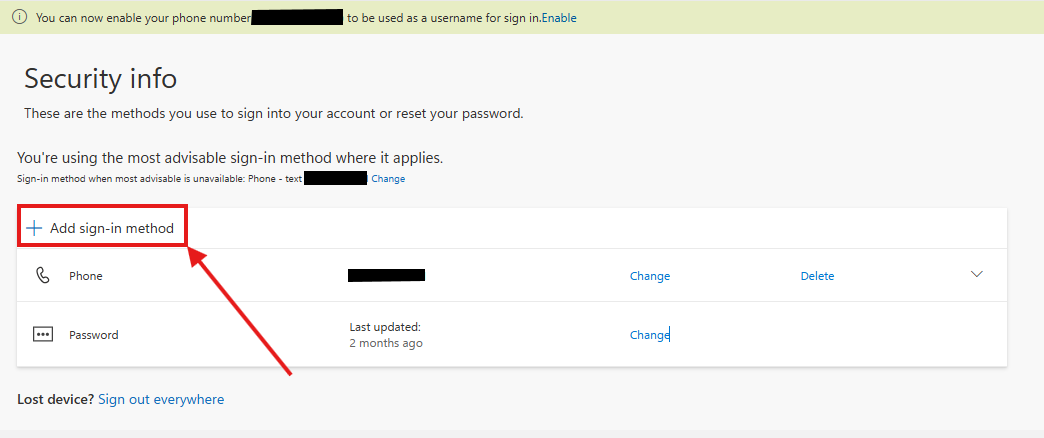
Step 3. Select the + icon for Add sign-in method.
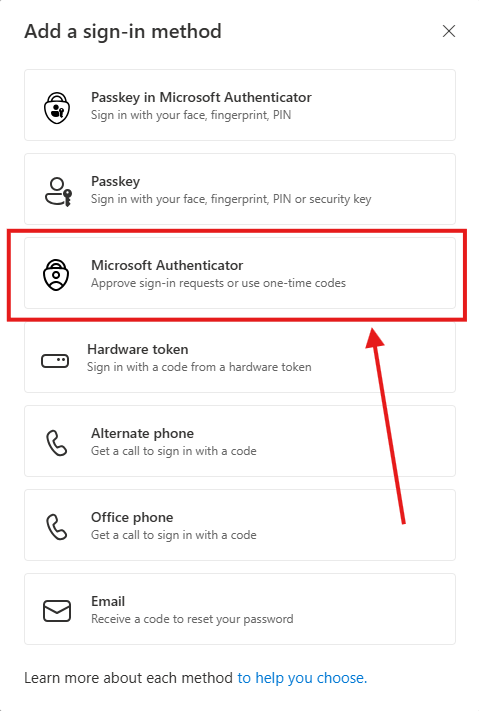
Step 4. Choose Microsoft Authenticator from the dropdown and select Add.
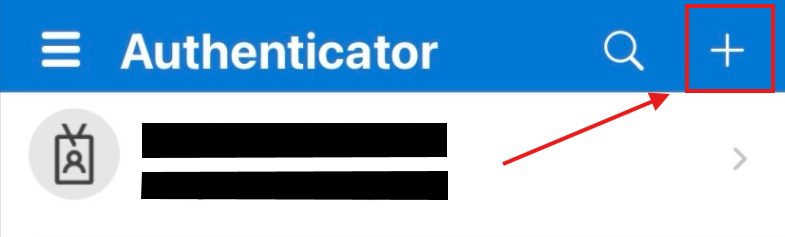
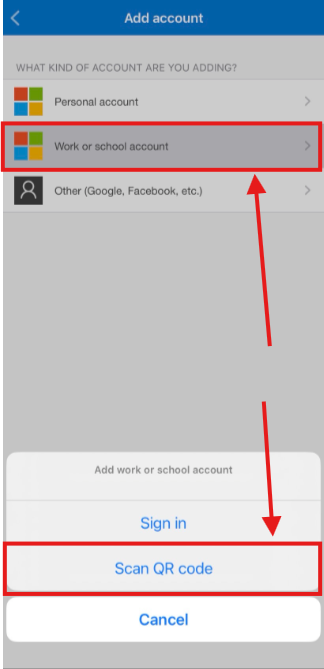
5. Open Authenticator on your phone and select the plus icon and select Add Account
6. Select Work or School account then tap Scan a QR Code.
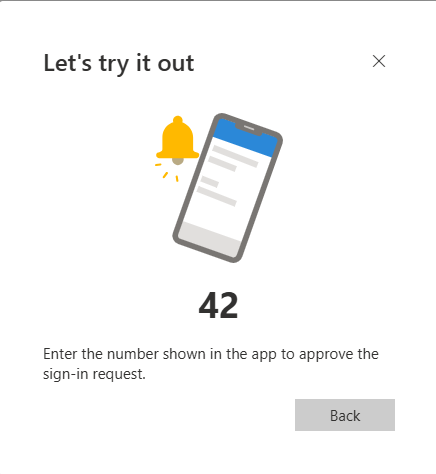
7. Enter the test code to try out the Microsoft Authenticator push code.
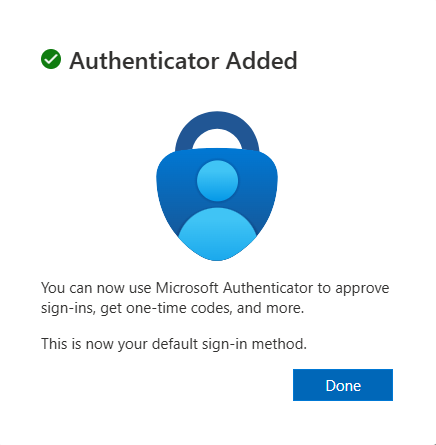
8. Confirm that the Authenticator is added.
Other Authentication Options
While Microsoft Authenticator is the recommended choice, supported alternatives may include:
FIDO2 security keys (such as YubiKey)
Passkeys
Hardware authentication tokens
Availability of these options may vary depending on individual account requirements.
Frequently Asked Questions (F.A.Q.)
Why are SMS and Voice authentication being retired?
The primary driver is security. SMS and voice are among the most vulnerable authentication methods available today and provide significantly weaker protection against phishing and account compromise than Microsoft Authenticator push notifications, or passkeys.
The other big driver are changes our technical partners, and specifically Microsoft are making. To comply with evolving industry standards, Microsoft is moving away from traditional authentication methods such as SMS and Voice, and will not support the method going forward. As a Microsoft campus, we must comply with their mandate.
Beginning October of 2026, the Microsoft Authenticator app has been automatically enabled for users currently enabled for SMS and Voice. Beginning January 8th of 2027, the retirement applies to all users, except for external users. If you haven't configured your Microsoft Authenticator app, or another MFA authentication method, you are encouraged to sign-up as soon as possible. Starting today, a growing number of users will be required to register with the Microsoft Authenticator app during sign-in before they can continue accessing their account. External users will follow a later retirement date of June 11th 2027. Internal guest users are not included in that June 11th group and are still to follow the January 8th retirement date.
How does this affect Self-Service Password Reset (SSPR)?
The retirement of native SMS and voice includes SSPR. Users who rely on SSPR are encouraged to migrate to the Microsoft Authenticator app or another valid authentication method as soon as possible.
Microsoft is also planning to introduce support to change password for users who authenticate with passwordless sign-in. More details to come.
Who should I contact if I have concerns about moving to a new MFA method?
We understand that some members of our community may have accessibility needs, technology limitations, international travel considerations, or other circumstances that could make this transition challenging.
If you have concerns about your ability to use Microsoft Authenticator or another MFA method, please contact the IT Help Desk at:
Website: Home | Support : Harrisburg University IT Helpdesk
Email: OISHelp@harrisburgu.edu
What happens if I do not register before the deadline?
If you do not configure your Microsoft Authenticator app or other authentication method within tiem, you will receive a blocking registration prompt to register with the Microsoft Authenticator app. Currently, this prompt is skippable, but at this time it will no longer be skippable and the prompt will need to be completed to complete Microsoft Authenticator app registration before you will be able to sign in.
Need Assistance?
The transition to stronger authentication methods is an important step in protecting the university community and safeguarding university data.
OIS Services will provide assistance, documentation, and support throughout this process. If you need assistance setting up the Microsoft Authenticator or determining which authentication method is right for you, please contact the Help Desk.
Thank you all for your cooperation and for helping keep our university community secure.